
Recent Posts

Spanish Hand Held Fans: A Fusion of Tradition and Style
Few accessories possess both cultural meaning and modern fashion as seamlessly as Spanish hand held fans....
What is the origin of traffic lights?
The traffic light is a familiar sight at intersections worldwide, but its origin is rooted in industrial...
Strategies for Promoting Your Independent Website
In the competitive landscape of the internet, promoting an independent website can be challenging but...
Optimizing Your Independent Website: Key Strategies for Success
In today’s digital age, having a strong online presence is crucial for businesses of all sizes....
Essential Features and Purchase Tips for Outdoor Sports Camera
When venturing into the world of outdoor sports, an outdoor sports camera becomes an indispensable tool...
How translation headsets revolutionize multilingual communication?
In today’s increasingly globalized world, communication across languages has become a necessity for businesses,...
How to Experience 3D Effects Without 3D Glasses
In this blog, we’ll break down the concept of 3D without 3D glasses. We’ll explain how it works and also...
What Systems Are Naked-Eye 3D Displays Suitable For
Naked-eye 3D display technology is rapidly advancing, offering a way to view 3D content without the need...
The Structure and Composition of Barcode Printer
A barcode printer is a specialized device designed to print barcodes onto labels, tags, or other materials....
Earpiece Translator Real Time: Revolutionizing Communication Across Languages
In today’s interconnected world, effective communication across languages is more important than ever....

Category

small vertical monitor

What Are the Best Use Cases for a Small Vertical Monitor?

As work styles and digital content continue to evolve, displays are no longer simply about being bigger. Compared with traditional horizontal monitors, a small vertical monitor offers better space efficiency and stronger support for vertically structured information. As a result, it is being adopted by more and more professionals. In multi-monitor setups, content creation workflows, and data monitoring environments, a small vertical monitor can significantly improve productivity with relatively low cost. Below are the most practical and effective use cases for a small vertical monitor.

1. Coding and Developer Workflows

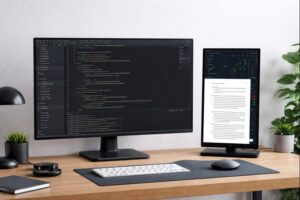
In programming and software development, a small vertical monitor is a powerful productivity tool. Code is naturally vertical in structure. When used in portrait mode, a vertical monitor can display far more lines of code at once, making functions, logic blocks, and dependencies easier to understand while reducing constant scrolling. This helps developers stay focused and maintain mental flow during long coding sessions. A small vertical monitor is also ideal as a secondary display for:

  • Live logs and debugging output
  • Terminal windows and command lines
  • API documentation, manuals, or reference pages

With the main monitor dedicated to writing code and the vertical screen handling supporting information, developers can work more efficiently—especially in limited desk spaces.
small vertical monitor

2. Document Reading and Writing

A small vertical monitor excels at document-heavy tasks. Its portrait orientation closely matches paper formats such as A4 or Letter, making it ideal for reading PDFs, contracts, reports, and academic papers. Less zooming and fewer page changes create a more natural reading experience and reduce eye strain during long review sessions. For writing and editing tasks, a vertical monitor works well for:

  • Displaying reference materials or outlines
  • Viewing original text alongside revisions
  • Comparing edited versions with comments or feedback

This setup makes content comparison easier and significantly improves writing efficiency.

3. Social Media Management and Content Operations

With short-form video and mobile-first content becoming dominant, vertical formats are now the standard. This makes a small vertical monitor especially valuable for social media professionals. Common use cases include:

  • Previewing vertical videos for platforms like TikTok, Instagram Reels, and YouTube Shorts
  • Managing multiple social media dashboards
  • Monitoring comments, messages, and performance metrics

For live streaming or content production, a vertical monitor can also serve as an auxiliary screen for scripts, live chat, or product information, providing a more accurate representation of the end-user viewing experience.

4. Stock Tracking and Data Monitoring

In finance, trading, and data monitoring environments, a small vertical monitor is a cost-effective yet highly efficient solution. Its vertical layout is ideal for displaying:

  • Stock tickers, prices, and percentage changes
  • Real-time charts and market data
  • Server status dashboards and system alerts

Often used as an always-on monitoring screen, a small vertical monitor keeps critical information visible without interfering with main-screen tasks.

5. Design and Creative Support

While large main monitors are essential for design and editing work, a small vertical monitor plays an important supporting role for creative professionals. It is commonly used to:

  • Display reference images, mood boards, or inspiration materials
  • Host color palettes, layers, and asset libraries
  • Keep communication tools visible for client or team feedback

By moving supporting panels off the main screen, designers can maintain a cleaner workspace and stay focused on creative output.

Why More People Are Choosing a Small Vertical Monitor

The growing popularity of the small vertical monitor comes down to several key advantages:

  • High space efficiency: Its narrow footprint takes up less horizontal desk space, making it ideal for compact workstations or setups that already include a main display.
  • Improved multi-monitor productivity: As a second or third screen, it has a clearly defined role—handling documents, chats, logs, or monitoring tools—reducing constant window switching on the main monitor.
  • Better experience for vertical content: Whether reading long documents, reviewing code, or scanning data lists, a vertical layout shows more continuous content and requires less scrolling.
  • Cost-effective upgrade: Compared with replacing a main monitor, adding a small vertical monitor delivers a noticeable productivity boost with a lower investment.

Conclusion

A small vertical monitor is not designed to replace a primary display. Instead, it serves as a highly efficient companion for specific workflows. Its real value lies not in size, but in how well its orientation matches vertically structured content. When your daily work involves code, documents, data tables, or vertical media, integrating a small vertical monitor into your setup can create a cleaner, more efficient multi-screen workflow—without requiring extra desk space or high costs. In display choices, the right layout matters more than a bigger screen.

Share This Post

©goodnessshare . All Rights Reserved