In the world of digital content creation, editing efficiency and precision are essential for achieving high-quality results. Whether working on photo retouching, video production, or graphic design, the tools used can significantly impact workflow speed and creative output. One technology that has transformed modern editing processes is the Touch Display, which allows users to interact directly with visual content using fingers or a stylus. This direct interaction removes many traditional barriers between the creator and the workspace, offering a more intuitive and fluid editing experience. But what exactly are the main benefits of using a Touch Display for editing tasks? The following chapters will explore its main advantages in detail.
More Natural and Intuitive Editing Experience
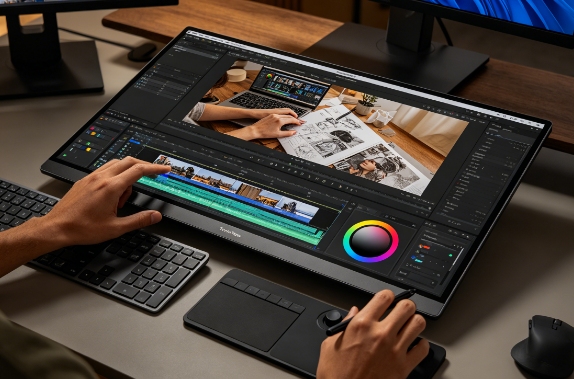
One of the most significant advantages of touch displays is that they allow users to interact directly with content, thereby supporting editing tasks naturally.
- Direct manipulation of visual elements: Users can move, resize, crop, or adjust objects simply by touching them, making the editing process feel more like working on physical media.
- Reduced abstraction between idea and execution: Instead of using a cursor to control tools indirectly, creators interact directly with the image or video, which improves creative flow.
- Stylus precision for fine edits: When combined with a pen input, a Touch Display enables detailed brushwork, precise masking, and accurate retouching, especially in photography and illustration.
- Faster visual decision-making: Editors can instantly see the impact of adjustments, helping them make quicker and more confident creative choices.
This intuitive interaction style makes the Touch Display especially valuable for creative professionals who prioritize visual accuracy and workflow smoothness.
Improved Editing Speed and Workflow Efficiency
A Touch Display also enhances productivity by reducing unnecessary steps in the editing process and streamlining workflow actions.
- Faster navigation across projects: Editors can swipe, zoom, and switch between assets quickly without relying heavily on menus or shortcut combinations.
- Efficient timeline control: In video editing, users can drag clips, trim segments, and adjust sequences directly on the screen, speeding up timeline management.
- Reduced dependency on peripheral devices: Many routine editing tasks can be completed without constantly switching between keyboard and mouse.
- Simplified repetitive actions: Tasks like undoing changes, selecting layers, or applying adjustments become quicker with gesture-based controls.
These improvements enable creators to devote more time to refining their actual content, rather than to technical operations.
Enhanced Precision and Creative Control
For intricate editing tasks, accuracy is paramount; touchscreen displays offer advanced control options that can significantly enhance precision.
- Pressure-sensitive stylus input: Enables variation in brush strokes, opacity, and shading intensity, which is essential for digital painting and photo retouching.
- Pixel-level editing capability: Editors can zoom in and work on fine details with greater control than traditional mouse-based workflows.
- Layer and object manipulation: Direct interaction with layers makes complex compositions easier to manage and adjust in real time.
- Improved hand-eye coordination: Working directly on-screen helps creators align visual intention with physical movement more effectively.
This level of precision makes the Touch Display highly suitable for professionals who require detailed and accurate editing results.
Better Multitasking and Creative Flexibility
Modern editing work often involves a variety of tools and reference materials, and a touchscreen monitor can provide a more flexible and organized workspace.
- Split-Screen Workflow Management: Users can simultaneously view reference images, the editing timeline, and tool panels, thereby enhancing work efficiency.
- Quick switching between tools: Instead of navigating menus, editors can use touch gestures to switch tools or access frequently used functions.
- Real-time comparison editing: Changes can be applied and compared instantly, helping maintain consistency across creative projects.
- Adaptive workspace customization: Many systems allow users to personalize layouts for different editing tasks, improving workflow comfort.
These features help creators manage complex projects more effectively without losing focus or momentum.
Limitations to Consider in Editing Workflows
Despite the numerous advantages of touch displays, users should still be mindful of certain limitations before relying on them completely.
- Physical fatigue during long sessions: Continuous arm movement on a vertical screen may cause discomfort compared to mouse-based workflows.
- Software dependency on traditional inputs: Some advanced editing functions still rely on keyboard shortcuts for maximum efficiency.
- Learning curve for professionals: Users experienced with traditional setups may need time to adjust to touch-based editing techniques.
- Cost of professional-grade systems: High-quality displays with stylus support and color accuracy can be expensive.
These factors suggest that while the technology is powerful, it may not completely replace traditional editing setups in all scenarios.
Conclusion
In conclusion, a Touch Display offers significant benefits for editing tasks by providing a more intuitive, efficient, and precise way to interact with digital content. It enhances creativity through direct manipulation, speeds up workflows with gesture-based controls, and improves accuracy with stylus support. However, it also comes with limitations such as ergonomic challenges and software dependency on traditional tools. For most professionals, it serves best as a powerful enhancement rather than a complete replacement. Ultimately, its value depends on the user’s editing style, workflow complexity, and creative requirements, making it a highly beneficial tool in modern digital production environments.